
Repayments
Use this form to enter details about a claim for repayment of excess tax that the client is making.
All details that you enter on this form are used in the Finishing your tax return section of the Tax Return.
Choose the type of repayment
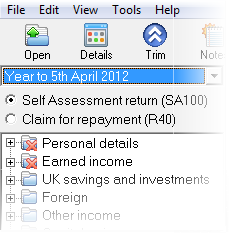
- At the top of the navigator, just below the Year to... drop down box you will see the options to choose whether to claim repayments via SA100 or R40. Show me
- Simply click the option you prefer.
- Navigate to Payments and Repayments > Repayments. The Repayments page appears.
- Enter the required details on the Repayments page; the information required varies only very slightly depending on your choice of repayment type.
Click on a heading below for more information about the details to enter in each section.
Repayments page
| Option | Description |
|---|---|
| No claim for this tax year | Choose this option if you do not wish to make a claim for the current tax year. |
| Repay tax overpaid to: |
Choose how to reclaim your tax overpayment.
|
| Interim claim |
Tick if an interim claim is made. Note: This is only present if claiming a repayment via the R40. |
| Retain details on year update | Tick this box if you want to keep all the selections and details when you carry out a year update for the client. |
Bank or building society details
Complete this section if it is available.
| Bank name | e.g. HSBC or Halifax. |
| Address of bank | Enter the address of the branch which the client/nominee belongs to. |
| Postcode | Enter the postcode of the bank/building society branch. |
| Name of account holder | Enter the name of the account into which the client wants the repayment to be paid. |
| Branch sort code | Enter the sort code of the client's/nominee's bank/building society branch. |
| Account number | Enter the account number of the account into which the client wants the repayment to be paid. |
| Building society reference | Enter the reference number of the building society, if this applies. |
Nominee details
Complete this section if it is available
| Nominee is tax adviser | Tick the box if the client wants their repayment to be made to their tax adviser. |
| Adviser's reference | Enter the reference number that the client's agent uses for the client. |
| Name of nominee | Enter the name of the nominee to whom the client wants the repayment to be made. |
| Address of nominee | Enter the address of the nominee to whom the client wants the repayment to be made. |
| Postcode | Enter the postcode of the nominee to whom the client wants the repayment of excess tax to be made. |